How to Install the 501TV App On Android, FireTv, and Google Tv devices
1. Install the Downloader app from the Play Store on your Android device. or if your device doesnt have a store click here : Direct download or Alternate app
2. Open the Downloader app and enter the provided code to download the 501TV app.
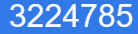
3. If you see an Unknown App source warning, select allow from this source so Downloader can do the install.
4. If you see an “Unsafe App Blocked” warning, select “install anyway” to proceed with the installation.
5. Once the app is installed, open it to reach the login screen.
6. Take a picture of the login screen and send it, OR send the MAC address that’s displayed on the login screen.
Video Guide
How To Setup 501TV On Roku, Tizen, WebOs, Apple Ios, Foxxum, Whale Tv
- Install the XCLOUD App. (If your device doesn’t have a search function then manually navigate through the apps to install it.)
- Open the XCLOUD app
- Take a picture of the login screen and send it, OR send the Device Key that’s displayed on the login screen.